Building a Recovery Tool for the Brilliant Labs Halo Glasses

)I’ve written a bit about the Brilliant Labs Halo, and wanted to give a bit of light as to how I’m coming into things.
Am using a preproduction iteration of the Halo hardware. And with this, I do not have access to any versions of Noa which work along with it. I’ve essentially have had to work from what I can understand from previous experience, the Halo SDK, and pure luck.
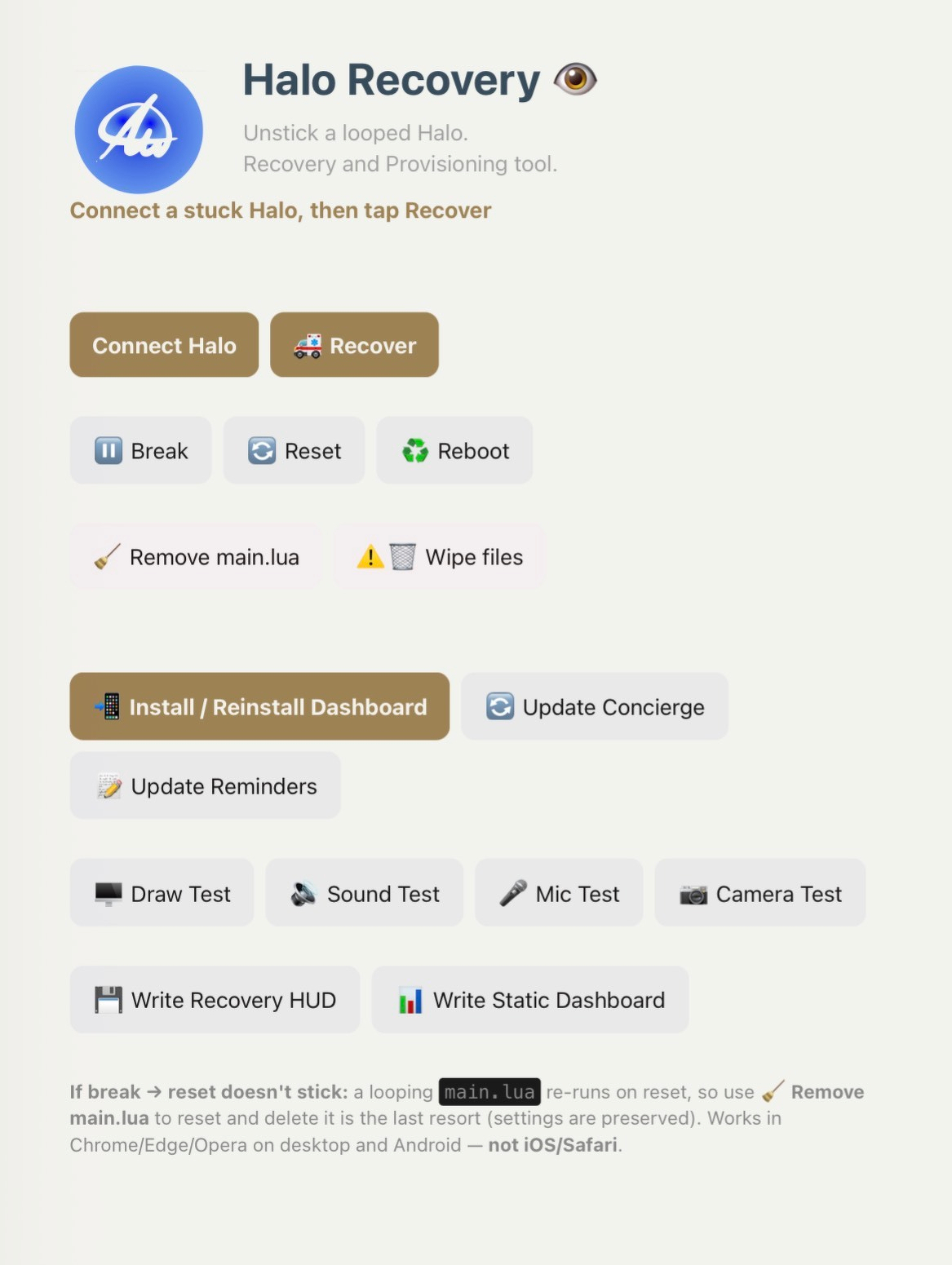
Attached to this is the Halo Recovery dashboard (progressive web app), that I’ve made to help me thru things. This is a fork of another Frame/Halo PWA I’ve got going, so I’m deliberately leaning on lessons. However, this is just focused to Halo… specifically recovering from messing it up. Because that’s exactly what I did.
Recovery Tools
I’ve got a few initial recovery tools at the top here which can interrupt any running process on the Halo and get me back to a working state. Haven’t had to use Break much, but Reset and Recovery are good friends now.
Below that “Remove main.lua” and ‘wipe files” were made as something of a nuclear option. You see, when I accidentally hard reset the Halo glasses, I had no way to get back to start. So these two recovery bits were my “find a way back home” function.
Provisioning and Tiny Dashboard’s Breakthrough
Once I understood enough to attempt integrating the other PWA, I realized that a provisioning option needed to be on the table. That what shows in the next section. What I did here was to create first a Recovery HUD and Draw Test. I needed to at least get something to show on the HUD, since I’m working with essentially nothing else but an empty main.lua. I decided that writing a static dashboard (called Tiny Dashboard) to main.lua would be the right way forward here. It took a while, but eventually I’d gotten these functions to not only draw a simple square in the HUD, but also reboot into this Tiny Dashboard.
Tiny Dashboard has more or less been my breakthrough. After getting it started, I chatted with a few LLMs (Dia, Claude, Replit, ChatGPT…) about various ways forward. We settled onto something that works really nicely with the Halo SDK implementation: a main.lua which can call smaller, separate .lua files to do stuff.
In my case, I have an existing PWA on the same domain. And this recovery tool lives within the same folder. So I could actually share web storage and have my Tiny Dashboard pull from it. This is what happens with the three buttons at the beginning of the recovery section (Install/Reinstall Dashboard, Update Concierge, Update Reminders).
Concierge is part of the name of that other PWA, and we’ll, it’s got its own .lua which main.lua pulls in and shows on the HUD. And if by chance I update Concierge, I can just click the Update button here, and the HUD shows me the update (with some different colored text in the updated parts to boot).
Reminders isn’t integrated yet. I want something better than my initial thoughts. But this might actually wait for figuring an integration to one/all of the reminder datasets I use, or something else.
New Function Tests and Next Steps
Along the way, I’ve actually (re)broken Halo a few times. The last times was me trying to scheme how to get towards camera, mic, and speaker functionality w/o going the way of using the emulator.
I took from the lessons with the Draw Test and have recently come up with a Mic Test and Sound Test. The Mic Test evaluates the ability of Halo’s on board mic to work. And though one of the SDK’s functions, will capture the audio volume and show it w/n the HUD dynamically for a few seconds before showing a confirmation and the loudest sound recorded. The Sound Test plays one of the Halo system sounds in an ascending (rising) manner. It only goes up to about 50% volume though, because that is loud enough when Halo is on your face/head. After it plays, it asks for a confirmation that sound played. Oh, and these tests also have a confirmation dialogue on the Halo Recovery’s status line.
You will notice there’s a Camera Test button. That’s next. I think it is possible to have Halo capture an image, then send it back to the browser. I’m working thru the nuances of this one during my trip this weekend. If I’m successful, I’ll have a means of testing the camera from Halo and get you all a “best image possible” to post here. No promises. Just something I’m working towards.
All of that to say that while it is a blessing to have this early hardware iteration of the Halo glasses, I don’t have assumptions that I’m doing anything extra special. I’m probably actually taking the hardest way possible to a few of these items.
And at the same time, I have stumbled upon a means to get Halo back up and going… and it works from my 1st gen Microsoft Duo (Android 12L). There’s something to be said for open source allowing for some of this kind of “if you can imagine it, then try it” kind of stuff.
My development environment is split between iPadOS and macOS. Testing happens on macOS and Android. And Android gets the benefit of being used in live tests due to the Concierge bit. I’m having a bit of fun, a bit of frustrations, and a lot of “oh so that’s how this goes” with all of this.
Hope this helps shed some more light to what I’m doing. And as always, comments, questions, and asks are welcome.
Learn more and purchase your own pair at the Brilliant Labs website